
How to Use Solana Safely: A Beginner's Guide (2026)
From zero wallet to your first stake, in five clear steps. A practical, measured walkthrough of how to use Solana safely - wallet, seed phrase, buying SOL, spotting scams, and earning your first rewards.
TL;DR. Five steps separate you from a first stake on Solana: pick a wallet, write down your seed phrase, buy a small amount of SOL, learn to recognise a scam, stake. This guide walks all five in order. Total time, end-to-end, is around thirty minutes plus one epoch (~2 days) of waiting for your first reward to land.
This guide is for people who have never owned crypto, or who own a little and want to actually understand what is happening under the hood. It is written by an operator who has run a validator since 2020. Tone is plain. Order matters.
Solana itself is short to describe: a public blockchain (a shared database that thousands of independent computers agree on every few seconds) with the native coin SOL. SOL pays network fees and earns yield when staked. Compared to older chains, Solana is fast (sub-second confirmations) and cheap (a fraction of a cent per action). You do not need more theory than that to start.
Your path
- Pick your first wallet - five minutes
- Write down your seed phrase - ten minutes, but the most important step
- Buy your first SOL - fifteen minutes
- Learn the 5 scam patterns - five minutes, then ongoing
- Make your first stake - three minutes, then wait one epoch
Each step ends with a checkpoint marker. If you skip a step, the next one will not work as expected.
Step 1 of 5: Pick your first wallet
A wallet on Solana is just an app. It stores your private keys, shows your balance, and signs transactions when you approve them. Most are free.
There is a longer wallet comparison if you want to dig in, but the short answer is:
| If you want | Pick |
|---|---|
| The default, works everywhere | Phantom |
| Detailed staking and validator info | Solflare |
| Best swap rates, simplest mobile login | Jupiter Mobile |
| Wallet plus an exchange in one app | Backpack |
For 95 percent of first-time users, Phantom is the right choice. It works on phone and browser, supports Solana plus other major chains, and shows a transaction preview before you sign that catches most malicious calls.
Where to get it:
- Phone: download from the App Store or Google Play
- Browser: install from phantom.app directly
Common trap: searching "Phantom wallet" and clicking the first result. Sometimes that result is a paid ad pointing to a clone site that steals seed phrases. Type the address yourself, or use the link above.
✓ Step 1 complete - you have an empty wallet on your phone or browser
Step 2 of 5: Write down your seed phrase
This is the only step in this guide that cannot be undone.
In five years of running a validator, every catastrophic loss we have seen a delegator take has traced back to a seed phrase incident - not to the protocol, not to slashing, not to a smart-contract exploit. The 12 words below this sentence are the riskiest object in this guide.
When you first open your wallet, it will offer to "create new" or "import existing." Pick create new. The app will show you a 12-word recovery phrase. Those 12 words are the master key to your wallet. Anyone in the world with those 12 words can open a wallet on their device and move every token out in seconds.
There is no password reset, no support line, no fraud reversal. The chain does not care who typed the words.
How to store it properly
A simple, durable setup that works for almost everyone:
- Write it twice on paper, by hand, in the exact order shown. Do not print - printers cache data.
- Store the two copies in two physically separate places. A drawer at home and a safe deposit box. A safe at home and a trusted family member's safe. Anywhere a fire or theft in one location does not destroy both.
- Upgrade to metal once your balance is meaningful. A stamped steel plate (Cryptosteel, Billfodl, or a punch set on a steel washer) survives fire, water, and time. Paper does not.
That is the entire protocol. Ten minutes, twenty dollars, and it prevents the majority of catastrophic losses.
What never to do with a seed phrase
These behaviours cause the bulk of real-world losses:
- Storing it in a cloud-synced notes app (iCloud Notes, Google Keep, OneNote)
- Storing it in a regular password manager
- Emailing or messaging it to yourself "as a backup"
- Photographing or screenshotting it
- Typing it into a website that promises to "validate your wallet" or "claim an airdrop"
- Showing it on a video call or in a Discord screenshare
If anything asks for your seed phrase, the answer is no. The only legitimate use is the wallet app itself, the first time you import on a new device.
What if you already lost it
If you still have the device, move every token to a new wallet today. Generate a new wallet, write the new seed phrase down properly, send everything to the new address. The old wallet is now untrusted.
If you have lost both the seed phrase and the device, the funds are gone. There is no recovery. This is the single trade-off of self-custody.
✓ Step 2 complete - your seed phrase is on paper, in two places, nowhere digital
Step 3 of 5: Buy your first SOL
There are three honest ways to get your first SOL. Pick the one that fits your situation.
Path A - Buy on an exchange, then withdraw (cheapest)
- Open an account at a regulated exchange - Coinbase, Kraken, Binance, OKX. Pass KYC.
- Buy SOL with a bank transfer (well under 1% all-in) or card (~2.5% on Coinbase and Kraken, as of May 2026).
- Withdraw the SOL to your wallet address. Copy the address from your wallet, paste it into the exchange, double-check the first and last four characters.
- Send a small test amount first (0.1 SOL is enough). Confirm it arrives, then send the rest.
This is the cheapest path and the one we recommend for a first purchase, because the exchange step is transparent and reversible if something goes wrong before withdrawal.
Path B - Buy directly inside the wallet (faster, more expensive)
Phantom, Solflare, and Jupiter Mobile all have built-in card on-ramps (MoonPay or Coinbase Pay under the hood). Tap "Buy," enter an amount, complete a quick KYC, pay with a card. SOL appears a few minutes later. Fees typically run 3.5 to 4% as of May 2026.
Path C - Apple Pay through Jupiter Mobile (lowest friction)
If you are on iOS and want the fastest possible first SOL, Jupiter Mobile lets you sign in with Apple ID and pay with Apple Pay. The wallet is still self-custodial, backed by a passkey rather than a seed phrase at the start - read Jupiter's docs on key export before you hold meaningful amounts here.
How much to start with
Enough to learn, not enough to hurt. Between $20 and $200 for a first round is the right range for most people. Treat the first $50 as tuition.
Sending and receiving in 30 seconds
You will need to send SOL at least once during this step (the withdrawal from the exchange) and possibly again later. The flow is the same every time:
- Tap "Send," paste the destination address
- Verify the first four and last four characters match what you were given - malware can silently rewrite clipboard contents
- Enter the amount, review the preview, approve
Receiving is even simpler - tap "Receive," show the address or QR code. Network fees are 0.000005 SOL per signature - a small fraction of a cent at any normal SOL price. Solana finalises blocks every ~400 milliseconds, so a typical transaction confirms in about a second. Always keep a small SOL buffer (0.01 SOL is plenty) in your wallet for future fees.
✓ Step 3 complete - you own SOL
Step 4 of 5: Learn the 5 scam patterns
Most crypto losses are not hacks. They are people voluntarily approving malicious transactions because they were tricked. The five patterns below come from what we see most often when delegators write to us after a loss, and from the on-chain forensics of drained wallets we have been asked to look at. Read them once now, and they become reflexive.
1. Anyone asking for your seed phrase. There is no legitimate reason. Not support, not validation, not "syncing." The answer is always no.
2. Unsolicited DMs offering help. You posted in Discord or Telegram with a question. Three "support agents" DM you within minutes. All three are scammers. Real support never DMs first.
3. "Claim your airdrop" pages. A token appears in your wallet with a website link. The site asks you to "connect and claim." Approving the transaction drains your wallet. If you did not expect an airdrop, ignore it.
4. Look-alike URLs and search ads.
phantom.app is real. phantom-app.io, phamtom.app, phantom-wallet.com are not. Search engine ads frequently host phishing. Bookmark the real URLs and use the bookmark.
5. Transactions that ask for too much. Modern wallets show a transaction preview before you sign. It tells you what tokens will move and where. If a swap of "1 SOL for 0.99 USDC" actually shows "approve all tokens to unknown contract," cancel. Always read the preview. This single habit prevents the vast majority of drains.
✓ Step 4 complete - you can spot a phish before clicking
What we have seen go wrong
Three patterns recur in the support emails we receive and in the on-chain forensics of drained wallets we have been asked to inspect. None of them are about Solana failing. All of them are about people doing something that, in hindsight, was avoidable.
Pattern A - The "temporary" screenshot. A new user sets up their wallet at a coffee shop and screenshots the seed phrase to read it more carefully on the train. They never delete the screenshot. Eight months later, their Apple ID is phished through an SMS about a missed package - and within forty minutes, every wallet that has ever been imported on that phone is empty. The Photos backup was the leak. Not the wallet, not Phantom, not Solana. The "temporary" screenshot was the breach.
Pattern B - The clipboard with matching ends. A user copying their wallet address from Phantom to an exchange withdrawal field does the textbook safety check: first four characters match, last four characters match. The middle had been silently rewritten by clipboard-monitoring malware running in their browser. The 0.1 SOL test send goes through "successfully" - to the attacker. They then send the full balance, also to the attacker. The address-matching check only works if you verify three positions: front, back, and one cluster in the middle.
Pattern C - The look-alike validator. A delegator searches for a well-known validator name in their wallet's validator picker and finds two near-identical entries: same spelling, same icon, two different commission rates - 7% and 100%. The fake one had been live for three weeks for exactly this purpose. The delegator earned zero for one epoch (~2 days) before noticing, unstaked, and re-staked correctly. They lost about $4 in fees and one epoch of rewards. Survivable, only because they checked their wallet within 48 hours.
Notice what these three have in common: none are about Solana being unsafe. They are about people approving something they should not have approved, or trusting a safety check that was not actually checking what they thought it was.
Step 5 of 5: Make your first stake
Staking is the boring, durable way Solana pays you for helping secure the network. When you stake, you delegate your SOL to a validator. The SOL stays in your wallet, marked "staked." The validator uses your stake weight to vote on blocks, and the network pays out new SOL as rewards.
The math, in committed numbers (snapshot, May 2026):
- Network average reward rate: 5.3% per year, drifting between 5.0% and 6.0% with the inflation schedule and validator performance
- Most quality validators charge 5 to 10% commission, visible on-chain and inside every wallet's validator picker
- Rewards credit at the end of each epoch (~2 days), automatically, into the same stake account - no claiming required
You do not need to do anything between epochs. The balance just grows.
Native or liquid - pick your lane
Two real options, different in one important way: liquidity.
| Factor | Native staking | Liquid staking |
|---|---|---|
| Custody | Stake stays in your wallet | You receive a receipt token (raSOL, JitoSOL, mSOL) |
| Yield (May 2026) | 5.7% APY at the average quality validator | 5.3% APY typical across major LSTs |
| Time to unstake | One epoch (~2 days) | Instant (swap the receipt on a DEX) |
| DeFi usability | None - locked while staked | Full - use the receipt as collateral or in pools |
| Risk profile | Validator performance only | Validator + smart contract risk |
For a first stake, pick native. Cleanest custody, simplest mental model. You can always add liquid staking later. For the full head-to-head see native vs liquid staking, and for a staking-only walkthrough once you have SOL, see how to stake SOL.
The walkthrough
Three minutes, two real paths:
Through Hubra (curated):
- Go to hubra.app/s and connect your wallet
- Choose native staking
- Enter the amount of SOL to stake (leave 0.01 SOL for future fees)
- Read the transaction preview, approve
Through Phantom directly (manual):
- Open Phantom, tap your SOL balance, tap "Start earning SOL"
- Pick a validator (Phantom shows commission and APY)
- Enter the amount, confirm
A note from another validator on validator pickers: most wallet pickers sort by stake size or by raw APY, neither of which is what you actually want. What you want is a validator that has not missed leader slots in the last 30 epochs and charges in the 5 to 7% commission range. Anything outside that band needs a reason - and "highest APY in the picker" is rarely a good one.
If you hold stablecoins as well, you can earn yield on USDC the same way - same custody model, separate position.
What happens after you stake
Within one epoch (~2 days), the stake account moves from "activating" to "active." From the next epoch end after activation, a small reward credit lands automatically and compounds back into the stake. You do not need to do anything.
To unstake later, initiate the unstake and wait one epoch (~2 days) for it to deactivate. Then the SOL is back in your liquid balance.
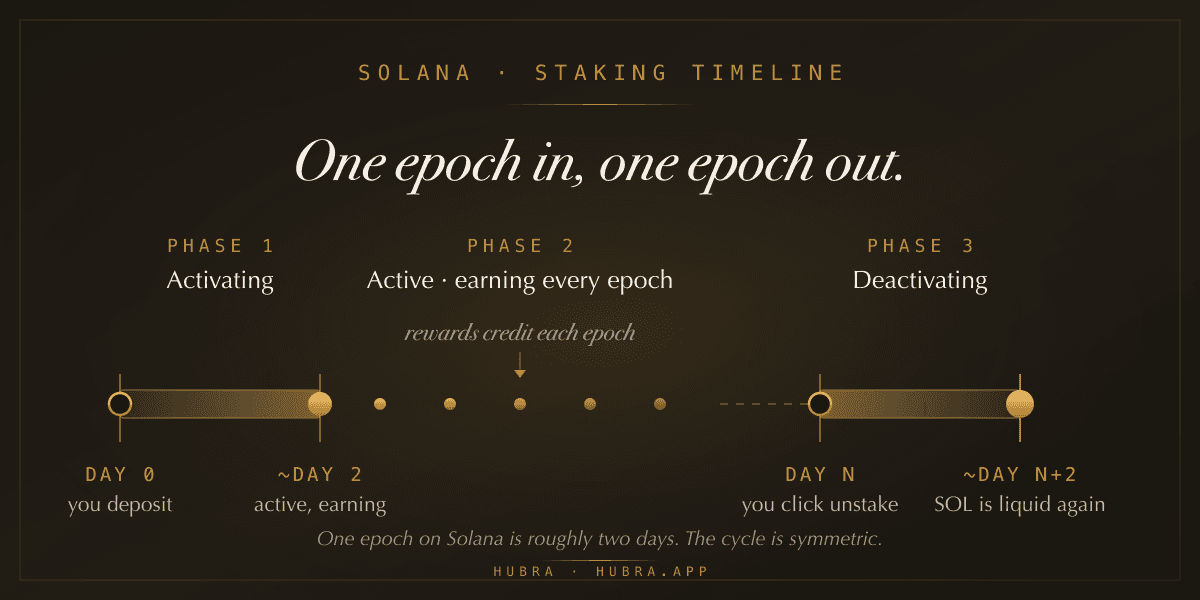
That two-day cycle - one epoch to activate, one to deactivate - is the entire timing model. If anyone tells you Solana staking takes "weeks" or "1 to 3 epochs," they are either confused or talking about a different chain.
An observation, since we watch this metric closely. A striking share of first-time unstakes cluster within 72 hours of a sharp price move - panic exits dressed up as decisions. If you stake with the intent of holding for at least three months, you will probably outperform yourself.
✓ Step 5 complete - your SOL is earning. You are done with onboarding.
After your first stake
A few topics that matter once you are past the first stake but do not belong on the critical path.
When to add a hardware wallet. Not at the start. Add a Ledger (the Nano S Plus at $79 is the entry model) once your holdings would genuinely hurt to lose - a rough threshold is one to two months of income. Buy direct from ledger.com, never from third-party resellers. Then connect it to Phantom or Solflare in hardware-wallet mode and physically confirm every transaction.
Taxes (not tax advice). In most jurisdictions, staking rewards are income at the moment they land, and later sales are capital gains. Keep a simple ledger from day one: date, action, SOL amount, USD value. An accountant who has filed crypto returns before is worth their fee for your first cycle.
Where to go from here.
- Earn on stablecoins (USDC, same custody model)
- How Solana staking actually works under the hood
- Our validator philosophy
- CEX vs DEX - when to use which
- Full liquid staking comparison
Frequently asked questions
Do I need to know how to code to use Solana?
No. Modern wallets work like banking apps. The hard part is taking your seed phrase seriously, not the software.
What is the cheapest way to get SOL?
A regulated exchange (Coinbase, Kraken) plus a withdrawal to your wallet. Total fees are typically under one percent. In-wallet card on-ramps are faster but cost 3 to 5 percent.
What is a seed phrase and what happens if I lose it?
It is the 12 or 24 word master key to your wallet. Anyone with those words controls the funds. Lose them and your device, and your SOL is gone permanently. Store them on paper or metal, in two physical locations, never digitally.
Is Solana staking safe?
For native staking through a known wallet, yes. Your SOL stays in your custody, Solana does not currently slash, and the validator only borrows your stake weight - they cannot move your funds. The main risks are operational (phishing, seed phrase loss), not protocol risk.
How long does my SOL stay locked when I stake?
One epoch to activate, one epoch to unstake. Each epoch is around two days. With liquid staking, you can exit instantly by trading the receipt token.
How much SOL do I need to start staking?
Any amount. There is no minimum on Solana for delegated staking - one SOL works as well as a hundred. Fees are a fraction of a cent, so even small stakes net out positive.
Can I lose my SOL by staking it?
Under normal operation, no. The realistic loss paths are seed phrase loss, phishing, or signing a malicious transaction in an unrelated app - none of which are caused by staking itself.
Do I have to pay taxes on staking rewards?
In most jurisdictions, yes. Rewards are usually treated as income when received, and later sales as capital gains. Keep records and talk to a local accountant.
Do I need a hardware wallet?
Not to start. Add one when your holdings would genuinely hurt to lose - a rough threshold is one to two months of income.
Phantom or Solflare?
Phantom for everything else. Solflare for serious staking with validator-level detail. You can use both with the same seed phrase.
Why is Solana so cheap and fast?
A different consensus design and a much higher-throughput runtime. The practical effect is that ordinary use - sending, staking, swapping - costs fractions of a cent and confirms in about a second.
On chain since 2020. Never a day down.
Last updated: May 2026. This guide is educational and not financial or tax advice.
 Education
What You Can Do With raSOL in Solana DeFi
Your staked SOL does not have to sit still. Five ways to put raSOL to work across Solana DeFi, from Kamino loops to Meteora liquidity, and the risks of each.
 Education
How to Stake SOL in 2026: A Complete, Practical Guide
A plain-English walkthrough of how to stake SOL in 2026: the two main routes, how to pick a validator, what APY to expect, how to exit, and the risks worth knowing, written plainly.
 Education
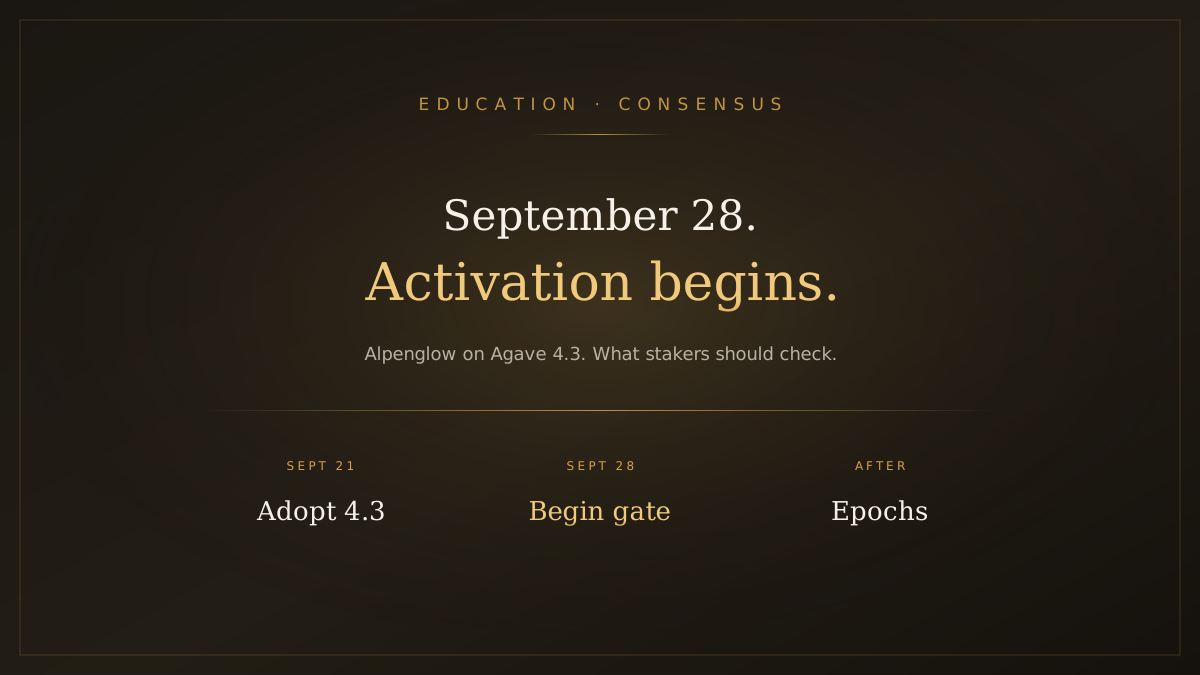
Solana Alpenglow Activation: What Stakers Should Check Before September 28
Alpenglow now has a provisional mainnet runway on Agave 4.3: general adoption September 21, begin feature activation September 28. A short checklist for stakers, not a republish of our earlier explainers.